Battleplan First Look: RTS Mechanics, Planning, and Realism
Get a comprehensive first look at Battleplan, exploring its map-drawing strategy mechanics, historical WW2 campaigns, logistics, and division command.
Published: Battleplan Wiki Editorial Team
Table of Contents
Introduction to Battleplan
When diving into a grand strategy title that simulates month-long World War II operations second by second, understanding the core interface and tactical workflow is essential. Developed by Foolish Mortals Games Inc. and published by Slitherine Ltd., available on Steam, the game steps away from traditional micro-heavy RTS designs. Instead, it emphasizes high-level operational planning, logistics, and realistic military movement based on actual geographic data. Whether you are stepping through early training exercises like Exercise Tiger and Exercise Fabius or preparing for major historical engagements, mastering how to draw orders, manage your chain of command, and keep supply corridors open will dictate your success on the battlefield.
Understanding the User Interface and Map Controls
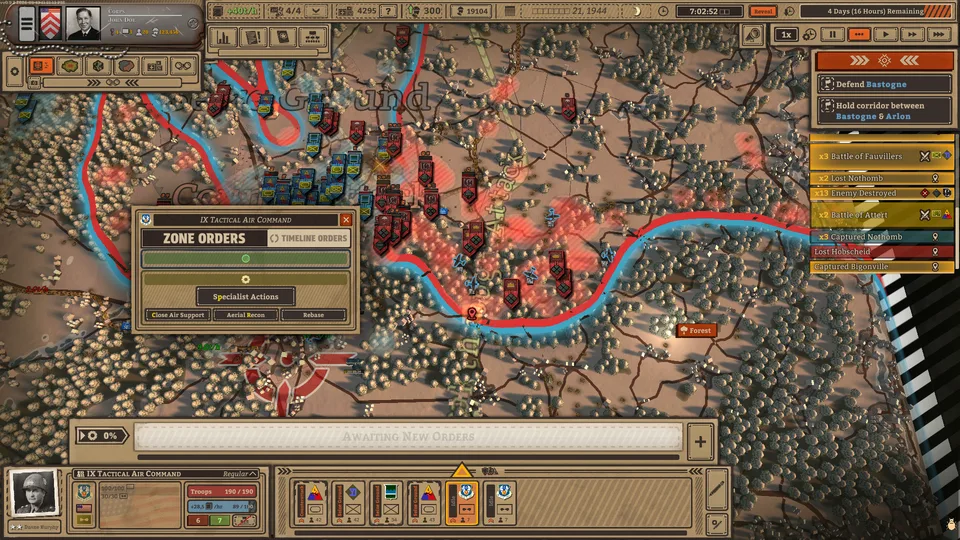
The operational interface of Battleplan can initially appear dense, but it is organized to give commanders complete visibility over supply, time, and unit formations.
Top Bar: Displays crucial global information, including supply status, incoming reinforcements, and global time controls.
Left Panel: Houses general information overlays, unit status, and terrain details.
Bottom Bar: Shows active divisions, formation statistics, total troop counts, and specific fighting elements.
Time Controls: Allow you to pause, play in real-time, or fast-forward through nighttime hours when visibility drops and units rest.
According to community reports, learning to navigate the map quickly by double-clicking unit selections to zoom in helps maintain situational awareness during fast-moving engagements. Players can toggle between NATO symbols and 3D unit icons in the top left corner depending on their visual preference for tracking units like infantry, artillery, engineers, scouts, anti-tank guns, and headquarters.
Core Army Composition and Combined Arms
Building a functional army requires understanding the specific roles of each unit type within your divisions. Units do not fight in a vacuum; they rely heavily on combined arms bonuses to boost nearby allies.
Infantry Divisions
The backbone of your front lines. They are relatively cheap to field, excellent at holding ground, and automatically dig fortifications when idle. However, they move slowly on foot and struggle on the offensive without artillery support.
Artillery Batteries
Capable of firing over long distances to soften up enemy fortifications and apply massive stat penalties, though they remain vulnerable in close-quarters combat and consume significant supplies.
Scouts and Engineers
Scouts autonomously move ahead to reveal and tag enemy positions while boosting nearby movement speed. Engineers can lay or clear minefields and construct improved fortifications under fire.
Headquarters and Anti-Tank Guns
HQ units stay behind the front lines to provide strong stat bonuses and house officers. Anti-tank guns hunt down enemy armor and vehicles, granting crucial firepower bonuses to nearby elements.
Community feedback highlights that keeping your infantry close to anti-tank and artillery units maximizes the combined arms bonus, ensuring your defensive lines do not buckle under sudden enemy breakthroughs.
Drawing Tactical Plans and Executing Regimental Orders
Unlike traditional RTS games where units move instantly on a right-click, Battleplan introduces an elaborate planning system where you draw orders directly onto the map.
Select a Objective: Identify your target location on the map, such as an enemy-held town or strategic crossroad.
Draw the Regimental Plan: Hold the left click and drag an area between your front lines and the target zone. The game automatically divides the area into manageable zones, such as seize ground objectives and reserve forces.
Assign Tactics: Adjust the tactical posture for each zone—such as balanced hold, counterattack, or cautious hold—depending on enemy resistance.
Execute and Monitor: Click the execution button to put the plan into motion, allowing your subordinate officers and companies to carry out the multi-step orders autonomously.
As noted in community walkthroughs, failing to set up proper regimental zones can cause your units to clump together or execute uncoordinated frontal assaults against heavily fortified enemy positions. Always utilize preparatory artillery bombardments and scout sweeps before pushing into unknown territory.
Mastering Logistics and Supply Lines
A brilliant tactical encirclement means very little if your troops run out of fuel, ammunition, and food. Logistics in Battleplan are realistically simulated based on terrain and distance from supply depots.
Tip
Always keep an eye on the blue supply bar in your division status panel. If a unit's supply number turns red, it means they are consuming more than they receive, leading to severe combat penalties, attrition, and eventual surrender.
To maintain your advance during long operations:
Place new supply depots near active reserve areas and along major roads to shorten transport routes.
Execute targeted resupply maneuvers by pulling vulnerable divisions back toward established supply hubs.
Cut off enemy supply lines by encircling hostile territory, starving opposing units of reinforcements and forcing them to surrender under mounting attrition and zero morale.
Campaign Structure and Historical Scenarios
Battleplan features over ten massive historical battles set on the Western Front from 1944 onward. Starting from foundational training scenarios like Exercise Tiger and Exercise Fabius—which teach basic drills, supply management, and complex encirclement tactics—players eventually progress to major engagements like the battle of Cherbourg and the defense of Caen.
Throughout these campaigns, you can requisition new divisions, promote or replace officers based on their unique traits and quirks, and integrate powerful air support assets such as reconnaissance flights, fighter-bombers, and heavy bomber formations to crack stubborn enemy lines.
Frequently Asked Questions
Is Battleplan available as a standalone game?
Yes, Battleplan is a full real-time strategy game available on Steam, developed by Foolish Mortals Games Inc. and published by Slitherine Ltd.
How does time control work during missions?
Missions are simulated second by second. You can pause at any time, play at real-time speed, or use fast-forward controls—especially useful during nighttime phases when units naturally halt operations to rest.
What are the minimum system requirements for Battleplan?
The game requires a 64-bit Windows 10/11 operating system, 4 GB of RAM, an Intel Celeron G4920 or AMD Athlon 200GE processor, and a DirectX 11 compatible graphics card such as an Nvidia GeForce GT 1030 or AMD Radeon RX 460.