Battleplan Strategy Guide: How to Master Commands and Logistics
Master the battlefield in Battleplan with our comprehensive strategy guide. Learn how to draw combat plans, manage supply lines, and optimize your chain of command.
Published: Battleplan Wiki Editorial Team
Table of Contents
Understanding the Battleplan Gameplay Loop
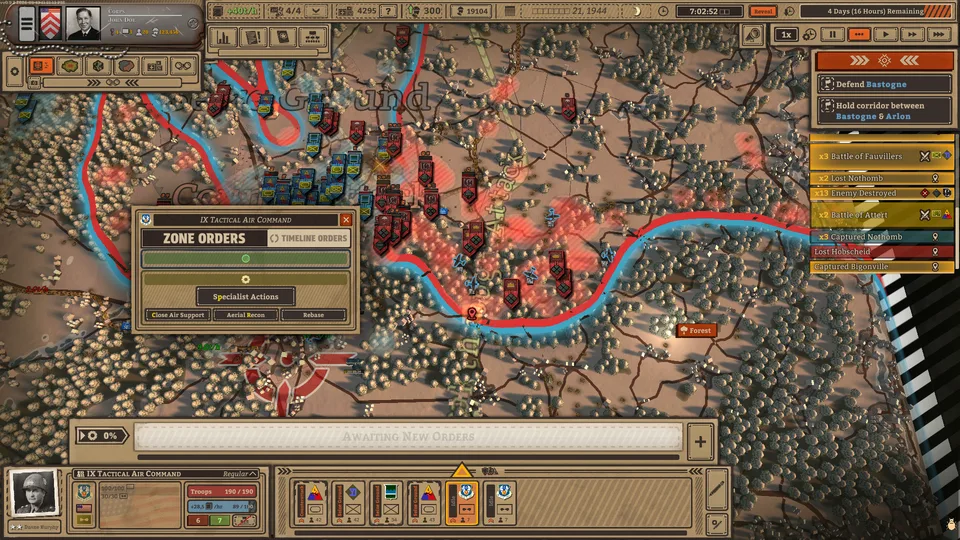
Battleplan represents a departure from traditional real-time strategy (RTS) titles. Instead of micro-managing individual infantry squads or tanks in a twitch-based environment, you act as a high-level commander. The game simulates month-long battles where your primary interaction is issuing orders by drawing directly on the map. Your officers and companies then interpret and execute these plans autonomously, day by day, second by second.
To succeed in this game, you must shift your mindset from "tactical control" to "operational planning." The game is about setting the stage, managing the logistics, and ensuring your units have the resources they need to carry out your vision. Whether you are playing through the early tutorials like Exercise Tiger or tackling major historical engagements, the core loop remains consistent: Observe, Plan, Execute, and Adapt.
The Art of Drawing Battle Plans
The defining feature of Battleplan is the ability to draw your orders directly on the map. This is not just a visual tool; it is the primary way you command your forces. When you draw an area, you are defining a zone of operation for your regiments.
How to Create Effective Orders
Creating a plan requires precision. If you simply draw a large circle, your units might bunch up or move inefficiently. Instead, you should create multi-stage offensives that account for terrain and unit capabilities.
Select Your Unit: Choose the division or regiment you want to command from the bottom bar.
Initiate Order: Click the "Order" button or use the planning tool to start drawing.
Define the Zone: Hold left-click to draw an area on the map. This defines where the unit will move and operate.
Select Tactic: Choose from options like "Seize Ground," "Breakthrough," or "Balanced Hold."
Execute: Ensure you click the execute button to finalize the plan. Your units will not act until the order is confirmed.
Remember that you can adjust these zones after they are created. Right-click and drag to resize your zones, ensuring they cover the specific objectives or defensive lines you intend to hold.
Mastering Logistics and Supply Management
One of the most critical aspects of Battleplan is logistics. Many new players make the mistake of pushing units too far forward without securing supply lines. If your units run out of supply, their combat effectiveness plummets, they suffer attrition, and they eventually surrender.
The Supply View
You should frequently toggle the supply view to check the status of your front lines. Green lines indicate a healthy supply flow, while red indicates a deficit. If you see your units consuming more than they receive, you must act immediately.
Tip
Managing Supply Hubs: Always place supply depots near your front-line units. If you are pushing deep into enemy territory, your supply lines will stretch. Build new depots to bridge the gap and keep your armor and infantry moving. If you capture an enemy supply depot, you can often turn it to your advantage, but be wary of the time it takes to capture and re-establish these hubs.
Army Composition and Chain of Command
Your army is a complex hierarchy of headquarters, regiments, battalions, and companies. Understanding the strengths and weaknesses of each unit type is essential for success.
Infantry
The backbone of your army. Excellent for holding ground and defensive operations. They dig in automatically but are slow on the offensive and require artillery support to overcome fortified positions.
Artillery
Essential for softening up the enemy. They provide long-range bombardment, lowering enemy firepower and morale. They are vulnerable in close quarters, so protect them with infantry.
Scouts
Your eyes on the field. They automatically reveal enemy positions and move quickly. They also provide movement speed bonuses to nearby friendly units.
Engineers
Critical for defensive and offensive preparation. They can lay minefields to stop enemy advances and clear enemy minefields to allow your forces to push through.
Tanks & Mechanized
High-mobility units with significant firepower. They are perfect for breakthroughs and encirclements but consume fuel and supplies rapidly.
You can customize your chain of command by dragging lines between units. If you need to specialize a force, you can split a division to create separate formations or merge them into a corps for easier management.
Strategic Tips for Victory
To consistently win in Battleplan, you must play methodically. The game rewards patience and preparation over reckless aggression.
Scout Before You Attack: Never send infantry into an unknown sector. Use scouts to identify enemy positions, fortifications, and minefields.
Use Specialist Actions: Before a major assault, use artillery barrages and engineer mine-clearing actions to soften the target.
Encircle the Enemy: Look for opportunities to cut off enemy supply lines. An encircled enemy unit loses morale quickly and will eventually surrender, even if they aren't destroyed in direct combat.
Watch the Time: The game allows for time manipulation. Use the fast-forward feature during quiet periods, but be ready to pause and issue new orders the moment an engagement breaks out.
Monitor Morale: Keep an eye on the morale bars of your units. If they start to break (indicated by white flags), pull them back to rest and recuperate.
The Role of Officers
Your officers are more than just flavor text. Each officer comes with specific traits and abilities that can turn the tide of battle. A "Reliable" officer might give infantry a defense bonus, while another might boost damage at the cost of movement speed. As they gain veterancy, they unlock new abilities. Keep your headquarters safe; if an officer is killed or wounded, the entire formation can be paralyzed.
Frequently Asked Questions
Why are my units not moving after I draw a plan?
You must ensure you have clicked the "Execute" button after drawing your plan. Additionally, check if it is nighttime; some units may stop and rest during the night to avoid risky maneuvers.
How do I win when the enemy is heavily fortified?
Don't attack head-on. Use artillery to bombard the fortifications, use engineers to clear mines, and look for a flank. You may need to create a multi-stage plan where one group distracts the enemy while another maneuvers around to encircle them.
What should I do if my units are low on supply?
Immediately create a resupply order at your nearest supply depot. If you are too far away, you may need to pull your units back to a friendly territory or capture an enemy supply hub.
Are there different ways to play the game?
Yes. The game offers flexibility in how you handle planning. You can play with a system where you plan once a day with an "emergency meeting" option, or a more dynamic system where plans evolve over time. Adjust your playstyle based on the mission requirements.
By following these guidelines and respecting the complexity of the simulation, you will be well on your way to mastering Battleplan. Remember, you are the commander, not the soldier. Focus on the big picture, keep your supply lines secure, and let your officers handle the details.