Battleplan Gameplay Guide: Mastering Tutorials, Supplies, and Tactics
Struggling with the Battleplan tutorial or supply management? Learn how to assign officers, optimize supply lines, and execute successful combat orders in this WWII RTS.
Published: Battleplan Wiki Editorial Team
Table of Contents
Getting Started: Navigating the Tutorial
Battleplan offers a deep, tactical experience that emphasizes the planning phase of WWII combat. However, many players—including veterans of wargaming—have reported confusion regarding the initial tutorial missions. If you find yourself unable to progress or start a mission, you are not alone. The game’s UI, while detailed, requires specific steps to prepare your forces before entering the field.
The most common point of frustration for new players is the "Start Mission" button appearing greyed out. This typically happens because the game’s pre-mission preparation requirements have not been fully met. Before you can deploy, you must ensure your division is properly equipped with leadership and assigned to the mission roster.
How to Fix the "Start Mission" Greyed-Out Issue
Enter the Army Constructor: Open the menu where you build your divisions.
Assign an Officer: You cannot run a division without leadership. Click and drag an officer from your roster onto the top-level headquarters slot within your division.
Check Weight Limits: Ensure your division is not overweight. While the text on the unit selection buttons is small, exceeding the mission's weight limit will prevent deployment.
Update Pre-Mission Roster: Go back to the pre-mission screen. You must explicitly click and drag your prepared division into the "Initial units" slot on the right side of the screen. Simply building the army is not enough; it must be assigned to the mission.
Understanding Planning and Readiness Modes
One of the first decisions you make at the start of a playthrough is selecting your planning mode. This choice fundamentally dictates the pace of your campaign and how you manage your units during the heat of battle.
The standard Planning phase mode is designed for experienced players. It is strict, allowing only one phase during each day to plan orders. This requires foresight and precise timing, as mistakes can be costly. If you are new to the game, the developer-recommended "Readiness Mode" is significantly more forgiving.
In Readiness Mode, you can create new plans throughout the entire day. However, this flexibility comes with a trade-off: executing orders with no penalty requires you to wait for the readiness meter to hit 100%. If you execute orders prematurely, your units will suffer performance penalties. Balancing the need for speed against the need for readiness is the core loop of Battleplan.
Tip
Always pause the game when you need to adjust your plans. While it is tempting to let the action play out, the most successful commanders in Battleplan constantly pause to check the status of their plans, add new orders as objectives are met, and adjust their supply lines.
The Logistics of War: Supply Lines
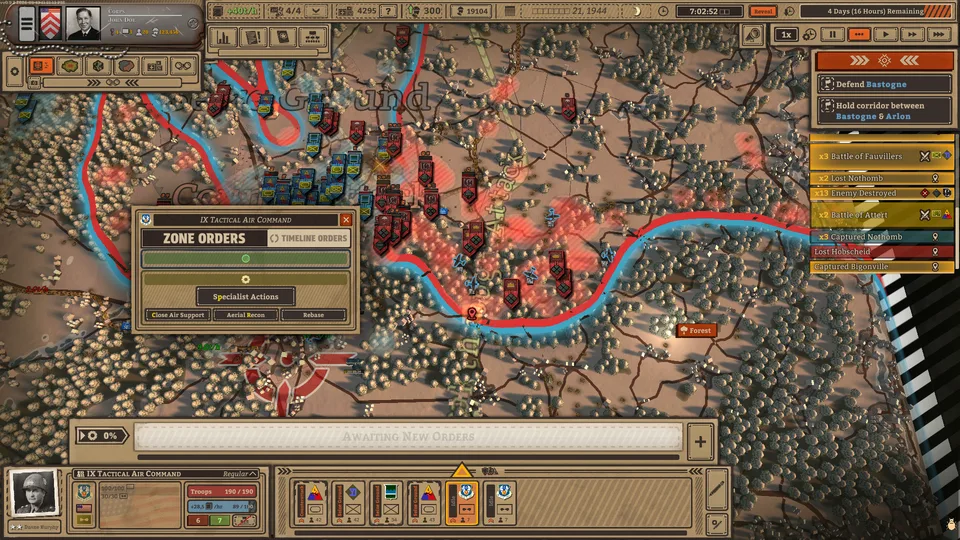
An army marches on its stomach, and in Battleplan, your units march on their supplies. A common mistake among new players is treating logistics as an afterthought. If your units run out of supplies, their morale will plummet, and their combat effectiveness will drop to near zero.
You are limited in the number of supply hubs you can have on the map at any given time. As your armored divisions push deeper into enemy territory, you will inevitably outpace your supply lines. You must actively manage these hubs.
When moving your front line forward, you will need to deconstruct existing supply points and rebuild them closer to your units. Note that this is not instantaneous; deconstructing and reconstructing take several minutes of real-time. If you fail to plan this transition, your units will be stranded in hostile territory without support.
Warning
Watch for the Warning Signs: When your units (especially air squadrons) begin flashing yellow or displaying warnings, they are likely low on supplies. If you do not address this by rebasing them or moving a supply hub closer, your offensive will stall, leaving your units vulnerable to counterattacks.
Combat Tactics: Scouting and Orders
Once your logistics are stable, you must master the art of issuing orders. The game provides several order types, each serving a specific strategic purpose. Using them incorrectly can lead to unnecessary losses.
Key Order Types
Assemble: This is primarily for movement. It allows units to move quickly, but they suffer a combat penalty if they run into the enemy. Do not use this for direct assaults.
Seize Ground: A standard offensive order. It is reliable for advancing infantry, though it can be slow against fortified enemies.
Breakthrough: Best suited for your armored divisions. It allows for rapid movement and punching through enemy lines, but it requires infantry support to "mop up" behind the tanks.
Artillery Barrage: Essential for softening up enemy fortifications before an infantry or tank assault.
The Importance of Scouting
Scouting is not just about "seeing" the enemy; it is a vital combat mechanic. When you use air recon or unit scouts to uncover enemy positions, those units become "marked" (indicated by a binoculars icon). A marked unit suffers from decreased morale and defense, and your artillery becomes significantly more accurate and damaging against them. Furthermore, scouting reveals enemy supply points, allowing you to cut their lines and force a surrender by starvation.
Tip
If you are struggling to identify what units are in an enemy formation, go to your settings and ensure "3D icons for units" is set to ON. This provides a visual representation of the formation, which is often easier to interpret than the text-based lists at the bottom of the screen.
Troubleshooting and Community Insights
Battleplan is a complex simulation, and as with many deep strategy titles, players occasionally encounter UI bugs or unclear mechanics. Community discussions have highlighted several recurring issues that developers are actively addressing.
Why can't I use WASD to scroll or the middle mouse button to zoom?
This is a known bug that can occur during specific tutorial missions. If this happens, try restarting the mission. If the issue persists, ensure you are not clicking on a UI element that has captured your mouse focus.
Why did my units stop fighting in the middle of a mission?
This often occurs if your units have achieved their initial objective (like an "Assemble" order) and have no follow-up orders. The game requires you to be proactive. If your units are idle, open the orders menu and issue a "Seize Ground" or "Counterattack" order to resume engagement.
Is the tutorial broken?
While some players have reported the tutorial to be confusing, it is generally functional. The most common "break" is actually a misunderstanding of the "Assemble" order. If your units are sitting in a town center and not fighting, it is likely because they are waiting for a new order. Try clicking "Reset Plan" to clear the queue and issue a fresh command.
Mastering Battleplan takes patience. It is a game that rewards the "commander" mindset—thinking three steps ahead, managing your logistical tail, and never leaving your units without clear, actionable orders. By focusing on supply management and choosing the right orders for the right situation, you will find that the game’s depth is one of its greatest strengths rather than a barrier to entry.