Battleplan Developer Guide: Real-Time WW2 Strategy and Planning
Explore developer insights, planning mechanics, and logistics for Battleplan, the World War II real-time strategy game on Steam.
Published: Battleplan Wiki Editorial Team
Table of Contents
Understanding the Developer Vision and Core Gameplay
When diving into a complex historical real-time strategy title, understanding how the creators intended the mechanics to flow can drastically change your approach. Developed by Foolish Mortals Games Inc. and published by Slitherine Ltd., Battleplan on Steam focuses heavily on historical accuracy and large-scale simulation. Rather than relying purely on micro-management, the game simulates month-long engagements where players issue high-level commands, allowing officers and formations to carry them out autonomously.
According to community reports and gameplay breakdowns, the title stands out because of its intricate balance between strategic preparation and automated execution. Players do not just click and move individual squads; instead, they draw multi-step plans directly onto maps utilizing real-world geographic data. Whether you are managing infantry divisions, armored spearheads, or air support squadrons, success relies on understanding how the development team structured the order of readiness, supply lines, and logistical networks.
Mastering Strategic Planning and Readiness Modes
Planning phases form the backbone of any successful campaign in the game. When starting a playthrough, players encounter different planning options that dictate how orders are processed.
Choose Your Planning Mode: Select between strict planning phases or the more forgiving Readiness mode, which allows you to draft new orders throughout the day at the cost of waiting for readiness percentages to rise.
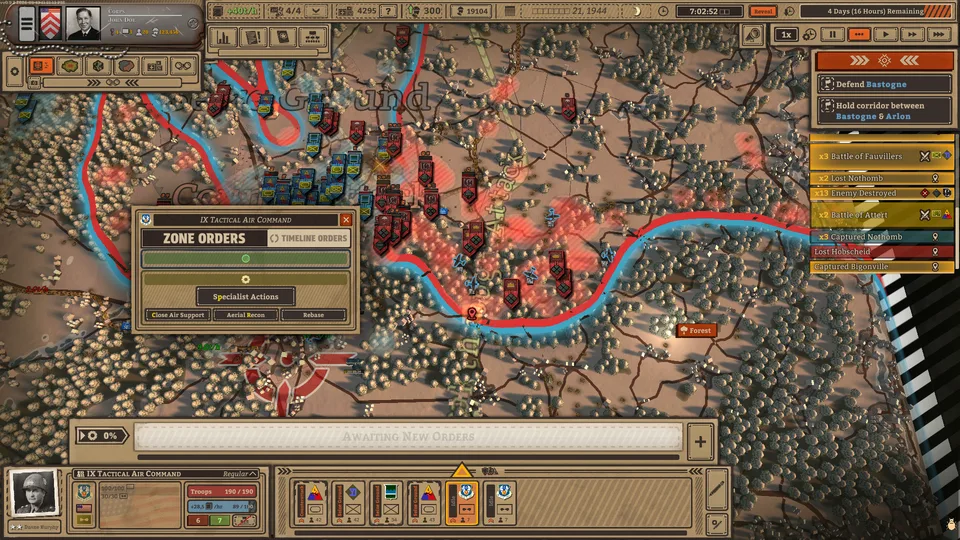
Draw Direct Orders: Use the map drawing interface to designate objectives, counterattacks, and specialized zone orders for your units.
Establish Formations: Assign historical units or custom formations, ensuring that specialized units like engineers or scouts are present to execute specific tasks like clearing mines or scouting enemy backlines.
Execute and Monitor: Trigger your plans while keeping an eye on time controls, pausing frequently to queue up subsequent steps before current objectives finish.
Community experience highlights that utilizing the Readiness mode helps streamline the command process. Because orders take time to reach 100% readiness to avoid performance penalties, successful commanders always plan the next two steps while current movements are underway.
Managing Logistics and Supply Lines
An army marches on its stomach, and the logistical simulation in this title treats supply lines with absolute realism. According to gameplay documentation and community reports, large maps provide a limited number of supply points—often just four per sector—that must be strategically placed and frequently relocated as your forces break through enemy lines.
Warning
Deconstructing and reconstructing supply points takes several minutes of real-time operation. Failing to maintain active supply hubs near the front will cause your units to lose morale and combat effectiveness rapidly.
Air squadrons and armored divisions consume supplies at high rates. If an armored spearhead pushes too deep into enemy territory without a corresponding shift in supply depots, your offensive will stall out. Similarly, air units left without an accessible supply point will flash warnings and suffer severe penalties to operational efficiency. Always ensure your logistics keep pace with your frontline breakthroughs.
Utilizing Air Support and Reconnaissance Assets
Coordinating ground forces with air assets provides a massive advantage during large-scale Western Front engagements from 1944 onward. Players can leverage multiple types of aircraft to soften up enemy positions and gather vital intelligence.
Air Scouts
Primarily used to scout enemy positions, reveal supply points, and mark enemy units with binoculars. Marking enemies decreases their morale and defenses while boosting the accuracy and damage of subsequent artillery barrages.
Close Air Support & Attack Aircraft
Tasked with striking enemy lines and following the paths of tank divisions during offensive breakthroughs to clear out remaining pockets of resistance.
Bombers & Heavy Assets
Brought in during later stages of massive set-piece battles to dismantle heavily fortified urban centers and defensive positions.
According to player feedback, failing to rebase air squadrons when moving supply points is a common trap. Keeping your air assets supplied is just as critical as managing infantry and tank divisions.
Customizing Your Army and Chain of Command
The game offers deep customization features that let players tailor their military structure down to individual unit patches and names. You can choose to use historical units for a streamlined experience or build custom army formations from scratch.
Chain of Command: Combine divisions into corps or break them down to company levels depending on your operational goals.
Officer Management: Hire, level up, and assign specific traits to officers leading your formations. Keep your leaders alive so they gain valuable veterancy and quirks.
Fortification Reduction: Utilize artillery bombardments to break down enemy fortification percentages before launching infantry or tank assaults.
Frequently Asked Questions
What platforms is Battleplan available on?
The game is available on PC via Steam, developed by Foolish Mortals Games Inc. and published by Slitherine Ltd.
How long do missions typically last?
Missions are simulated second-by-second and range in duration from one week to an entire month of combat time.
Can I speed up or pause the gameplay?
Yes, the title features time controls at the top right of the screen, allowing you to pause, play in real-time, or fast-forward as needed.