How to Download and Play Battleplan on Steam: Complete Strategy Guide
Learn how to access Battleplan on Steam, master its innovative map-drawing tactical systems, manage World War II logistics, and outmaneuver enemy lines.
Published: Battleplan Wiki Editorial Team
Table of Contents
H2: Accessing Battleplan on Steam
Finding and getting started with a grand-scale World War II real-time strategy game requires knowing where to look and ensuring your hardware meets the necessary criteria. Battleplan is officially hosted on its dedicated Steam Store Page, where players can review system compatibility, check community updates, and purchase the title.
When preparing to dive into the game, verifying your system specifications prevents unexpected performance hurdles during massive, month-long military simulations. According to official platform data, the game requires a 64-bit Windows 10 or Windows 11 operating system paired with a broadband internet connection and 8 GB of available storage space. For memory and graphics, minimum setups require at least 4 GB of RAM alongside an entry-level discrete GPU like an Nvidia GeForce GT 1030 or AMD Radeon RX 460. For an optimal experience during heavy combat simulations involving hundreds of thousands of troops, upgrading to 8 GB of RAM and recommended hardware like an Nvidia GeForce GTX 1040 or AMD Radeon RX 580 ensures smooth performance across sprawling European battlefields.
H2: Understanding the Unique Command and Map-Drawing Mechanics
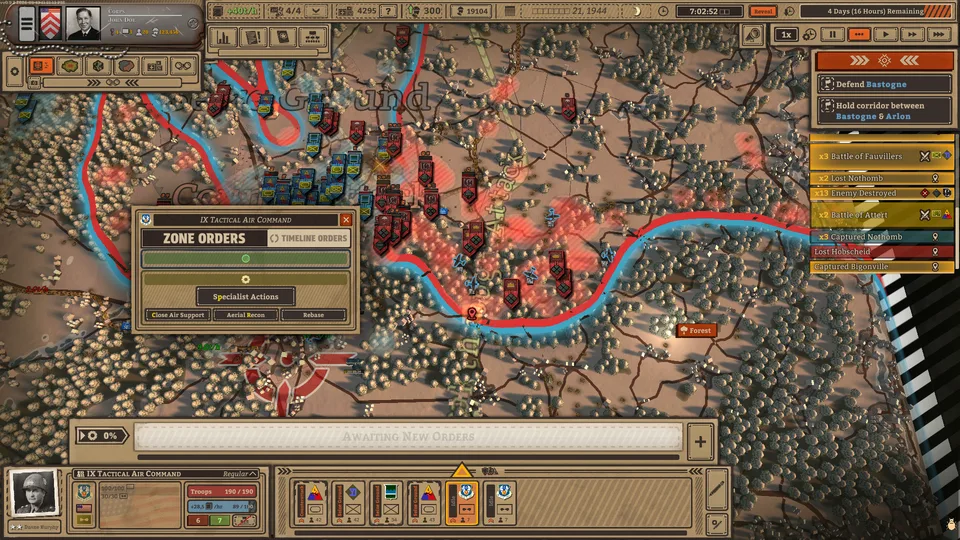
Unlike traditional real-time strategy titles where players micromanage individual squads constantly, Battleplan introduces a distinct planning phase and operational philosophy. You step into the shoes of a commander tasked with overseeing entire divisions, setting up your army corps, and assigning high-level directives that officers carry out in real time.
Configure Your Corps: Set up your commander persona, corps name, and insignia in the army customization menu. Match officer specialties and personalities with appropriate unit compositions.
Establish the Chain of Command: Connect individual units to their commanders or sub-commanders on the army board by dragging connection lines from unit cards to commander cards.
Draw Tactical Orders: Use the in-game pen tool directly on the map to outline movement areas, defensive lines, or breakthrough sectors.
Execute and Monitor: Review your setup, check supply statuses, and click the green check icon or start mission button to set your master plan into motion.
Community reports and veteran player advice emphasize that mastering the map-drawing interface takes practice. The pen tool anchors its movement to a starting point to form a closed operational area rather than a simple open line. If you make a mistake or need to adapt to shifting enemy positions mid-battle, the game offers flexibility through emergency orders or individual cancellation toggles on corps user interfaces.
H2: Mastering Logistics, Supply Lines, and Attrition
A recurring piece of advice from experienced tacticians is that battles are won or lost through logistics rather than raw frontal assaults. Historical realism dictates that an army marches on its stomach, and neglecting supply networks will quickly stall even the most heavily reinforced offensives.
Tip
Protect Your Supply Depots: When your units capture enemy field supply points, keep friendly forces stationed nearby. The enemy will actively attempt to retake these locations to cut off your resupply routes and drain your morale.
Units that become completely isolated from supply lines—either through clever enemy encirclements or by outrunning their own logistics paths—will gradually lose combat effectiveness and surrender. Similarly, relying too heavily on stationary artillery barrages consumes massive amounts of supplies. Players must balance aggressive breakthroughs with careful management of backline supply regeneration and night-phase resupply operations.
H2: Utilizing Specialized Units and Specialized Orders
Success across historical Western Front battlefields from 1944 onward requires more than basic infantry movements. Coordinating specialized units allows you to crack stubborn enemy defenses and exploit tactical breakthroughs.
Engineer Units
Essential for clearing hazardous minefields or setting up protective obstacles. Friendly army corps units become immune to local mine damage when closely escorted by nearby engineer detachments.
Artillery Batteries
Capable of delivering long-range preparatory bombardments to suppress enemy positions before a major assault. However, prolonged firing drains valuable supply stocks quickly.
Mobile Armored Corps
Highly mobile tank and vehicle formations designed to punch straight through created gaps in enemy lines, exploit weaknesses, and hunt down rear-echelon supply hubs.
According to community feedback, understanding the nuances of each specialized order type—such as holding lines, moving to contact, or initiating focused breakthroughs—prevents costly stalls against entrenched opponents.
H2: Frequently Asked Questions
Is Battleplan available as a multiplayer game?
Battleplan is designed as a single-player historical real-time strategy experience, focusing on massive historical battles and campaign operations against AI opponents.
Can I pause or adjust the game speed during missions?
Yes. Missions unfold second-by-second, giving you the complete freedom to pause the simulation, play in real-time, or fast-forward whenever necessary to evaluate the tactical situation.
How do I handle accidental misplacements or bad orders during the planning phase?
Before hitting the main start mission button, you are free to redraw battle lines, adjust defensive postures, and modify corps connections. Once the mission is live, you can cancel individual orders or issue limited emergency orders once per day.