Battleplan Commander Level Strategy Guide for RTS Logistics and Operations
Master commander-level strategy in Battleplan with our comprehensive guide covering map-based orders, supply line management, and multi-stage offensives.
Published: Battleplan Wiki Editorial Team
Table of Contents
Mastering Commander-Level Strategy in Battleplan
Tip
When executing tactical movements, always check your supply visibility and route continuity before issuing long-range advance orders to prevent costly attrition penalties.
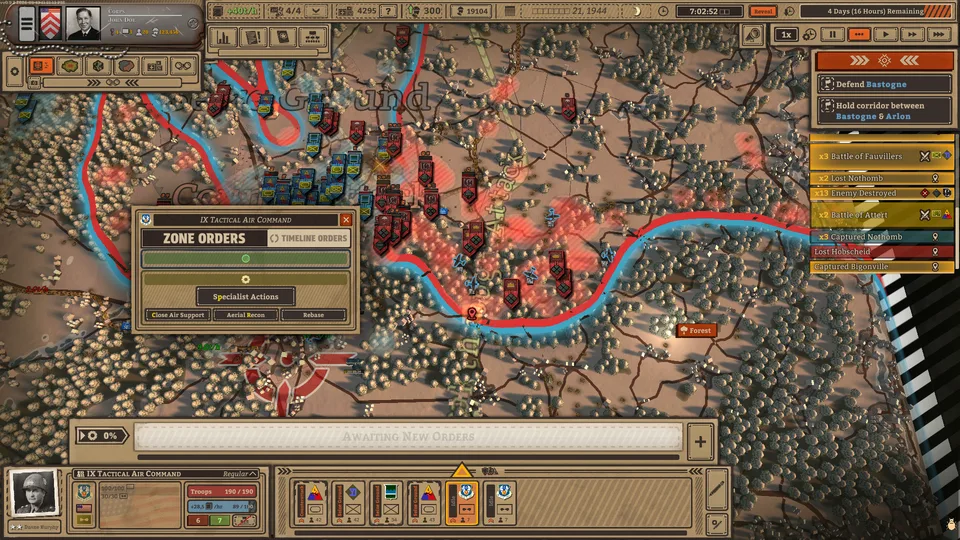
Entering the realm of historical World War II grand tactics requires a shift from micro-managing individual units to overseeing grand operational goals. In Battleplan on Steam, players step into the boots of a high-level commander tasked with managing entire divisions across massive battlefields modeled using real-world geographic data. Rather than clicking on single squads, you draw regimental plans directly onto the map, assigning zones, forming chains of command, and establishing supply networks that dictate the flow of combat.
Whether you are navigating early training scenarios like Exercise Tiger and Exercise Fabius or pushing into major engagements like the Battle of Cherbourg, understanding the core loops of planning, logistics, and combat mechanics will determine your success on the Western Front.
Understanding the Map-Based Planning Interface
Unlike traditional real-time strategy games where units react instantly to point-and-click commands, this title relies on structured operational planning.
Open the Planning Tool: Select your unit or regiment and activate the planning interface from the bottom UI bar.
Draw Operational Boundaries: Hold the left click and drag an area between your front lines and your objective to create a regimental plan.
Assign Tactical Zones: Divide your drawn area into specialized zones such as Seize Ground, Balanced Hold, or Reserves to dictate how regiments react.
Execute and Monitor: Review the predicted outcome bars and click execute, allowing your officers and companies to carry out the orders autonomously over time.
According to player experience reports, drawing one massive zone often leads to disorganized unit clustering and inefficient pathfinding. Splitting your forces into distinct regimental zones ensures that infantry, artillery, and specialized support elements advance in a coordinated front rather than bottlenecking at a single choke point.
Managing Supply Lines and Logistics
A brilliant offensive can quickly turn into a disaster if your troops outrun their logistics corridor. Realistic supply simulation is the beating heart of long-term operations in the game.
Supply Flow Indicators
Green numbers indicate that a unit is receiving more supplies than it consumes, keeping combat effectiveness high.
Supply Deficits
Red numbers signal that consumption exceeds incoming supply, leading to reduced combat stats, attrition, and eventual surrender.
Supply Depots
Constructing or capturing forward supply depots near reserve areas is essential for shortening supply routes during deep advances into enemy territory.
When your units run low on supply, their morale plummets, making them vulnerable to enemy counter-attacks. Community reports emphasize the importance of pulling back or pausing offensives to let logistics catch up, especially when operating far from initial supply hubs.
Utilizing Combined Arms and Specialized Units
Successful division management requires balancing different unit types, each with distinct combined arms bonuses and battlefield roles.
Infantry: The backbone of your army; excellent for holding ground and building fortifications, but slow on the offense and reliant on artillery support.
Artillery Batteries: Deliver devastating long-range barrages that inflict heavy damage and severe stat penalties on clustered enemies.
Scouts: Automatically move ahead to reveal enemy positions, tag routes, and provide movement speed bonuses to nearby friendly units.
Engineers: Essential for laying and clearing minefields as well as constructing improved fortifications during defensive postures.
Anti-Tank Guns: Hunt down armored vehicles and provide crucial firepower boosts against enemy mechanical threats.
Customizing your chain of command allows you to merge divisions into corps or split units down to company levels. Keeping your officers alive through tough engagements helps them gain veterancy and useful traits, though losing headquarters units under heavy fire risks paralyzing the entire attached group.
Frequently Asked Questions
What platforms is Battleplan available on?
Battleplan is available on PC via Steam, developed by Foolish Mortals Games Inc. and published by Slitherine Ltd.
How long do missions typically last?
Missions are simulated second by second and typically span anywhere from one week to a month of in-game time, featuring time-control mechanics that let you pause, play in real-time, or fast-forward.
Can I play custom battles or historical campaigns?
The game features over 10 massive historical battles set on the Western Front from 1944 onward, offering sandbox-like flexibility within preset tactical missions.