Battleplan Strategy Guide: Mastering Logistics and Combat
Learn how to dominate in Battleplan, the realistic WWII RTS. Master supply lines, unit management, and tactical planning to lead your divisions to victory.
Published: Battleplan Wiki Editorial Team
Table of Contents
Mastering the Strategic Flow of Battleplan
Battleplan, developed by Foolish Mortals Games Inc., offers a unique approach to the real-time strategy genre. Unlike many RTS games that focus on micro-management of individual units, Battleplan emphasizes high-level command, historical accuracy, and the logistical realities of World War II warfare. Success in this game requires a shift in mindset: you are a commander orchestrating divisions, not an operator clicking on individual soldiers.
The game simulates massive battles across real-world geographic data, where every road, forest, and town plays a role in your success. Whether you are playing the Allied campaign or individual scenarios as the Germans, understanding how to draw plans, manage supplies, and utilize your officers is essential.
Understanding the Planning Phase and Readiness Mode
One of the first decisions you make at the start of a new playthrough is selecting your planning mode. According to experienced players, enabling "Readiness Mode" is highly recommended, especially for those learning the ropes.
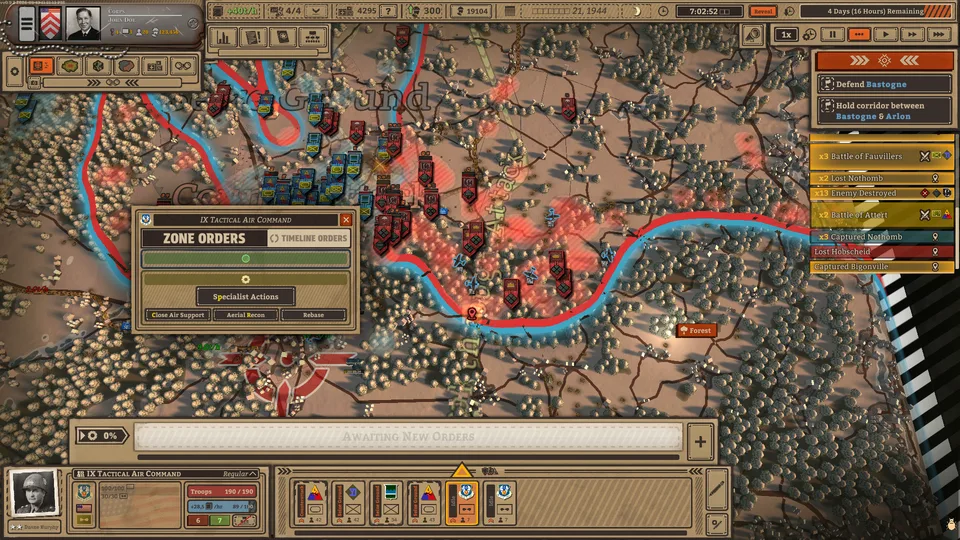
In standard play, planning can be rigid. However, Readiness Mode allows you to create new plans throughout the entire day. The trade-off is that plans require time to reach 100% readiness before execution to avoid penalties. This mode is more forgiving and, when paired with the "Zone Orders" system, allows for much more deliberate and flexible command of your armies.
Tip
Why Choose Readiness Mode?
While it adds a waiting period for plans to reach full readiness, Readiness Mode prevents you from being locked out of making tactical adjustments. It is the best way to learn how to layer orders, such as preparing artillery barrages while simultaneously ordering a breakthrough.
The Logistics of War: Managing Supply Points
Logistics is the heartbeat of your army in Battleplan. If your units run out of supplies, their morale collapses, and their combat effectiveness plummets. Managing your supply hubs is not a "set it and forget it" task; it is an active part of your offensive strategy.
How to Relocate Supply Hubs
Assess the Front: Use the "Supply Overview" at the top of the screen to identify where your current hubs are relative to your frontline.
Deconstruct: Click the supply hub and select the trash bin icon to remove it. Note that deconstruction and reconstruction take real-time minutes, so plan this during lulls in combat.
Relocate: Once the slot is free, place the supply hub closer to your advancing armored spearhead or critical offensive zones.
Monitor: Always ensure your air squadrons and specialized units have access to these hubs, or use the "Rebase" option if they are operating too far from their current support.
Executing Complex Combat Operations
Combat in Battleplan is defined by the interaction between your orders and the AI's autonomous response. You don't just tell units to "attack"; you draw zones and orders on the map.
Scouting and Intelligence
Before launching an assault, scouting is vital. Air recon units serve multiple purposes: they uncover enemy positions, mark them with a binoculars icon (which lowers enemy morale and defenses), and reveal enemy supply points. Targeting these supply points is the fastest way to cripple an enemy force without engaging them in a direct firefight.
The Breakthrough Strategy
Effective breakthroughs require a combination of different order types:
Artillery Barrage: Use this to soften up fortified enemy positions before an advance.
Seize Ground: This is your primary infantry order for taking and holding territory.
Breakthrough: Reserved for your tank divisions. These units move faster and are designed to punch through enemy lines.
Pre-Attack Checklist
[ ] Scout: Have you marked enemy units to reduce their defense?
[ ] Softening: Is the artillery barrage order placed on the target?
[ ] Support: Is the close air support squadron pathing towards the breakthrough zone?
[ ] Logistics: Are your supply points positioned to support the advance?
[ ] Future Planning: Have you queued the next order? Always stay one step ahead.
Army Management and Customization
The game allows for deep customization of your order of battle. You can build your army by hiring officers, leveling them up, and choosing traits that complement your playstyle.
If you prefer to jump straight into the action, the "Use Historical Units" option is available at the start of missions. This bypasses the need for manual army building, allowing you to focus purely on the tactical simulation. However, for those who enjoy the management aspect, the game offers granular control, down to the level of choosing individual unit patches and names.
Handling Officers
Officers are not just cosmetic; they gain veterancy and develop quirks over time. Keep them alive and ensure they are assigned to formations that fit their strengths. If you find your units are struggling, check their status box at the bottom right of the UI to see if their morale or supply levels are critically low.
Common Pitfalls and How to Avoid Them
Even experienced players can fall into traps when the pace of battle accelerates. Here are a few common issues reported by the community:
Ignoring Supply Lines: It is easy to get caught up in an offensive, but if your tanks move faster than your supply lines, they will stall. Always keep a "logistical springboard" ready.
Over-relying on Default Plans: While the game can auto-place units, manual planning is superior. Don't be afraid to adjust the borders of your drawn zones using the right mouse button.
Forgetting to Rebase: If you move your supply hub, your air units might lose their connection. Remember to use the "Rebase" command for your aircraft to ensure they remain operational.
Speeding Up Time Too Much: While you can fast-forward, remember to pause frequently to adjust plans as the situation on the ground changes. If a plan fails or an objective is captured, your units may sit idle unless you issue new orders.
By focusing on the "Plan-Execute-Adapt" loop, you will find that Battleplan is a deeply rewarding simulation. Take your time, watch your supply levels, and ensure your officers are well-positioned to lead your divisions to victory.