Battleplan Steam Strategy Guide: Master Grand RTS Planning and Logistics
Discover how to conquer massive WWII battlefields in Battleplan on Steam with expert strategies for map drawing, logistics management, and unit control.
Published: Battleplan Wiki Editorial Team
Table of Contents
Introduction to Grand Scale Strategy in Battleplan
[!TIP>
Essential Readiness Mode Tip
Always consider turning on the Readiness mode for planning when starting a new playthrough. While stricter because orders take time to reach 100% readiness, it provides a much more forgiving gameplay system compared to rigid single-phase daily limits.
Diving into Battleplan on Steam requires a complete shift in how you think about real-time strategy games. Instead of micromanaging every single soldier's exact footsteps on a micro-scale, you act as a high-level commander shaping month-long historical operations. Developed by Foolish Mortals Games Inc. and published by Slitherine Ltd., this title challenges you to draw intricate operational boundaries directly onto authentic geographic maps.
Success on the Western Front from 1944 onward demands patience, meticulous supply line management, and an understanding of how divisions interact under autonomous execution. Whether you are adjusting your army's chain of command, deploying air support, or managing critical supply hubs, mastering the game's core loops will determine whether your armored spearheads break through enemy lines or stall out in hostile territory.
Mastering Operational Map Drawing and Orders
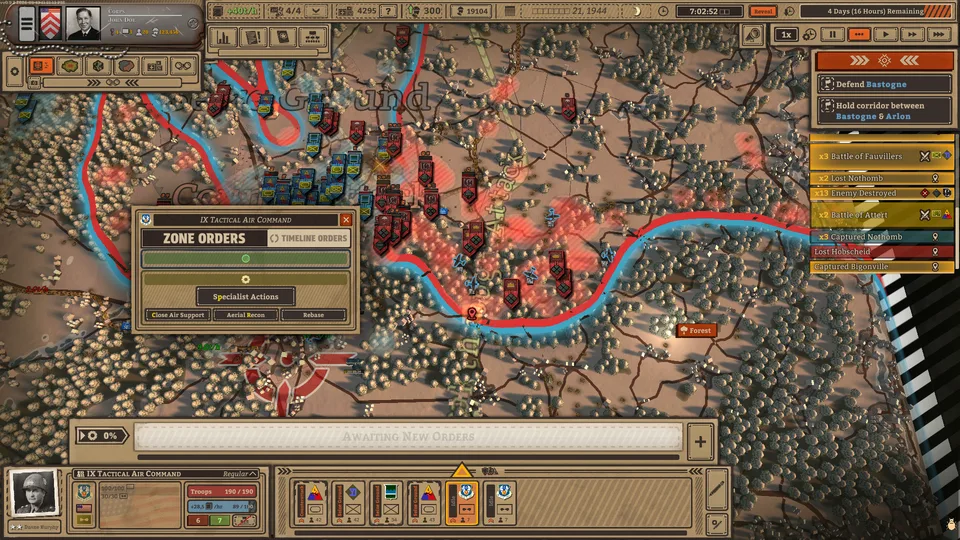
Creating elaborate plans in Battleplan relies heavily on the map interface. Rather than clicking individual units to attack, players draw multi-step, multi-unit directives directly onto the terrain.
Each order type serves a specific strategic purpose and is color-coded for clarity. Defensive orders appear in blue, offensive maneuvers in red, and specialist tasks in gray.
[!STEPS>
Establish the Line: Use defensive orders like counterattacks or ground-seizing lines to pin enemy forces in place and drain their morale.
Scout and Reveal: Deploy air reconnaissance or specialized scout units to uncover enemy positions, which triggers a binoculars icon that reduces enemy defense and boosts your artillery accuracy.
Execute Breakthroughs: Once the enemy frontline is softened, deploy armored divisions on a breakthrough order toward vital rear objectives.
Mop Up: Follow fast-moving armor with infantry divisions assigned to seize ground and eliminate isolated pockets of resistance.
According to player experience and community reports, managing color-coded army formations can feel confusing initially. Each army division receives a single distinct color to display its drawn orders, making it easier to track separate forces operating side-by-side once you adapt to the visual language.
Logistics and Supply Chain Management
An army marches on its stomach, and in Battleplan, ignoring logistics will inevitably lead to catastrophic failure. Massive maps provide limited supply points—often just four per sector—meaning you must constantly evaluate when to dismantle and relocate forward hubs.
[!WARNING>
Supply Relocation Delays
Relocating a supply point is not instantaneous during active gameplay. Deconstructing and reconstructing a supply hub takes several real-time minutes. Always ensure multiple supply points remain operational to prevent your troops from losing morale and combat effectiveness.
When your armored spearheads punch deep into enemy territory, they consume supplies at an alarming rate. If you neglect to move supply depots forward or forget to rebase your air squadrons to nearby villages, your units will display warning indicators and suffer severe penalties to combat readiness. Furthermore, cutting off enemy supply lines by capturing their depots is one of the most effective ways to force opposing forces to wave white flags and surrender.
Army Customization and Officer Management
Before launching into massive campaigns, players can fine-tune their military structure through the army builder. Community feedback highlights the depth available when structuring your forces down to individual unit patches, names, and equipment attachments.
[!CARDS>
Custom Army Construction
Manually edit existing army formations, hire officers with specialized traits, combine traits with custom designs, and choose historical unit presets to jump straight into action without manual assembly.
Officer Veterancy and Quirks
Keep your division officers alive throughout long campaigns. As they survive engagements, they gain veterancy and unique quirks that influence how effectively your high-level orders are carried out.
If you prefer a faster entry into combat, enabling the "Use Historical Units" option automatically places formations at their expected historical locations. However, taking the time to manage your chain of command, attach engineers for mine clearing, and position artillery on high ground using real-world elevation data yields significant tactical advantages.
System Requirements and Technical Specifications
Before purchasing the game on Steam for $29.99, ensure your PC meets the necessary system requirements to handle large-scale tactical simulations.
[!CHECKLIST>
Operating System: 64-bit Windows 11 or Windows 10.
Yes. Missions are simulated second-by-second, giving you full freedom to pause, play in real-time, or fast-forward at your convenience using the time controls in the top right corner of the screen.
How long do missions typically last?
Mission lengths in the game generally range from one week to a full month of simulated combat time, requiring careful pacing and long-term logistical planning.
What should I do when my air units run out of supplies?
You must use the rebase option to move your air squadrons to a captured village with an active supply point, or they will lose operational effectiveness due to fuel and ammunition shortages.